

RxSavings-Center - Online Guide and Tutorial
What's this all about?
We designed our Rx-Savings Finder tool to help people like you search for the best prices on prescription drugs. Use the Rx-Savings Finder to find out whether your prescription drugs are covered by one or more discount drug program at local retailers.
Not sure how to use our Rx-Savings Finder tool?
No Problem!Our discount prescription drug information can be used in a number of different ways (including with the Rx-Savings Finder).
- If you want to just search for the discount drug plans for a certain prescription drug, you can just browse alphabetically by drug name.
- If you want, you can also search through the complete list of discounted drugs offered by a specific retailer in your area. We also have a list of all medications that are offered in at least one retailer's discount drug program.
- We also allow you to browse through the medications that are sorted by drug usage categories, such as "Arthritis and Pain" or "Heart Health and Blood Pressure"
- Finally, more advanced users can also search through different drug usage categories, and at the same time, compare up to four discount drug programs with our Rx-Savings Finder.
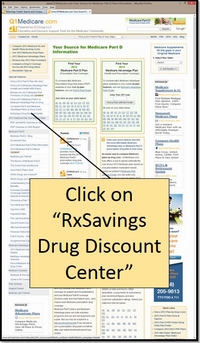
First Step ... Click on the "RxSavings Drug Discount Center" Link on the Left
Begin by clicking on "RxSavings Drug Discount Center" from the left-hand Q1Medicare.com navigation. You will also find links to the Rx-Savings Finder on the Q1Medicare.com Homepage or through Google's site search tool.Drug Information Disclaimer: Before you go too far, please note that the contents of this website, Q1Medicare.com are provided for informational purposes only and are not meant as a substitute for professional medical or pharmaceutical advice. Please consult your physician or pharmacist if you have any questions about your health or medications.
The RxSavings Center and the Rx-Savings Finder
are available to all people at no cost. We originally designed the RxSavings Center to help the millions of Medicare
beneficiaries who have reached the donut hole or coverage gap portion of their Medicare Part D prescription drug plan.
However, the RxSavings Center can be used by anyone who wishes to get an overview of national or regional retail
discount drug programs. If you have any suggestions of other discount drug programs,
please click here to let us know.
Please note your privacy is important to us and we do not share or sell any of your private information with other people.
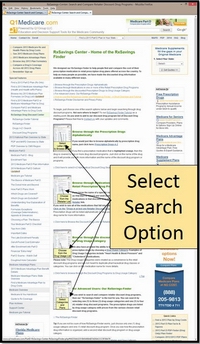
Next ... Choose how you wish to seach through the discount drug programs.
After choosing the "RxSavings Drug Discount Center" link from the Q1Medicare.com navigation you will find a listing of all the different ways that you can search the discount drug plans and how to use the Rx-Savings Finder tool.As noted above, there are a number of different ways to search through the discount drug programs.
- The simplest way to search may be for you to browse, alphabetically for the name of your medication. If you choose a letter and do not find your medication in the list of drugs, you may want to check the spelling of the drug or, perhaps your medication is not covered by a discount medication program. Click on the medication name if you wish to see more details and which discount drug programs include this medication.
- You may want to browse all of the medications available from a particular retailer or retail drug discount program. Just click on the retailer who is offering the discount drug program and you can browse alphabetically through the available medications. also search through the complete list of discounted drugs offered by one or more retailers in your area. Click on the medication for more details.
- You can also browse for your medications through drug usage categories. Drugs are organized by the retail discount drug program into such categories as "Arthritis and Pain" or "Heart Health and Blood Pressure" or "Woman's Health". Again, you can click on the medication name for more details.
- Finally, we have Rx-Savings Finder, an advanced search for users to select one or more drug usage categories offered by different discount drug programs. Drugs are listed with prices of up to four discount drug programs. You can click on the medication name or on the name of the discount drug program for more details.
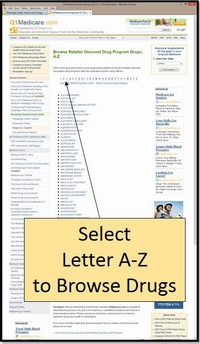
The Alphabetical Drug Search
The first and simplest way to browse the discount drug plans alphabetically for the name of your medication.Take a browse through the prescription drugs under your chosen letter. These drugs are all included in one or more retailer discount drug program. For example, if you click here you will see the medications that start with the letter "C". You can click on the medication name and view more details on the medication.
First, you need to click on the first letter of this drug. So we will click on the letter "P". Now you will see a list of all the drugs that begin with the letter "P" that are covered under one or more discount drug plans.
When we use our mouse to scroll down to the drug "Potassium Chloride", we need only click on the name of the drug and see the details of the discount drug plan or plans. You can
click here for an example of the discount coverage of "Potassium Chloride".
You will notice that this drug is covered under several different discount drug programs including those provided by Krogers, Kmart, Wal-Mart, Walgreens, Target, Giant Eagle (from different states), and Schnucks.
The detail shows the retailer's name, the cost for the medication, the strengths and form of the medication, and the drug usage category used by this retailer.
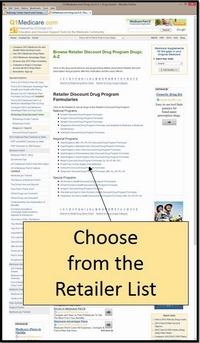
Searching Through a List of Drugs included in one or more Drug Discount Programs
A favorite way to search for people who know where they wish to shop is to simply search through a list of drugs included in one or more Drug Discount Programs or search the drug list of a specific retailer's drug discount program.Once you are in one of the lists, the prescription drugs are listed alphabetically within the retailer's drug usage category. At any time, you can click on a drug name for more information.
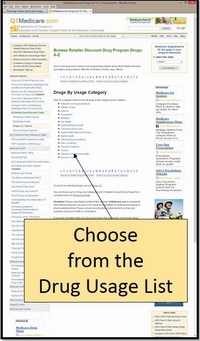
Searching Through a Drug Usage Category
Another way to search for discounted prescription drugs is by browsing through the different retailers' Drug Usage Categories.As we note in the "RxSavings Drug Discount Center", the Drug Usage Categories are a convenience provided by the retail discount drug programs. Drug Usage Categories may not duplicate pharmaceutical drug classes or categories. If you have any questions about your prescription drug classification, please consult your pharmacist or physician.
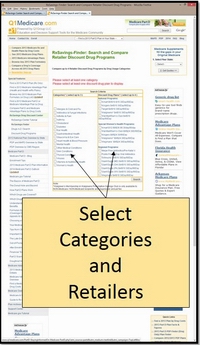
The RxSavings-Finder Search and Comparison Tool
If you decide to compare different retail plans in your area by drug category, then you may want to use the more advanced features of our Rx-Savings Finder. First, let's follow some steps Where to begin?The Rx-Savings Finder requires that you select up to 3 drug usage categories and up to 4 retailer discount prescription drug programs to compare. You choose your categories and programs by clicking in the box to the left of the desired category/program.
Now click the "search" button below the programs. A chart will appear with the discount programs across the top and the prescription drugs, sorted alphabetically within category down the side. The word "Yes" will appear across from the drug name, under each program which covers that particular drug.
To review program details such as pricing, drug strengths, drug form, and any program stipulations, click on the drug name. You will be take to a detail page for this particular drug which shows all of the details for every retailer discount prescription drug program which is currently in our database.
The drug detail page also contains a link to more drug details such as drug interactions, side effects, and alternatives.
- Sign-up for our Medicare Part D Newsletter.
- PDP-Facts: 2024 Medicare Part D plan Facts & Figures
- 2024 PDP-Finder: Medicare Part D (Drug Only) Plan Finder
- PDP-Compare: 2023/2024 Medicare Part D plan changes
- 2024 MA-Finder: Medicare Advantage Plan Finder
- MA plan changes 2023 to 2024
- Drug Finder: 2024 Medicare Part D drug search
- Formulary Browser: View any 2024 Medicare plan's drug list
- 2024 Browse Drugs By Letter
- Guide to 2023/2024 Mailings from CMS, Social Security and Plans
- Out-of-Pocket Cost Calculator
- Q1Medicare FAQs: Most Read and Newest Questions & Answers
- Q1Medicare News: Latest Articles
- 2025 Medicare Part D Reminder Service